 MarineOps
 Phone App Manual › Getting Started
My To-Do List
Jot down what you need to do and check it off.
Included in: Every plan
My To-Do is your own checklist. Jot things down as they come up during the day, such as a callback, a part to order or a photo to send, and check them off when they're done. Only you can see your list. Nobody else in the shop can, not even the owner.
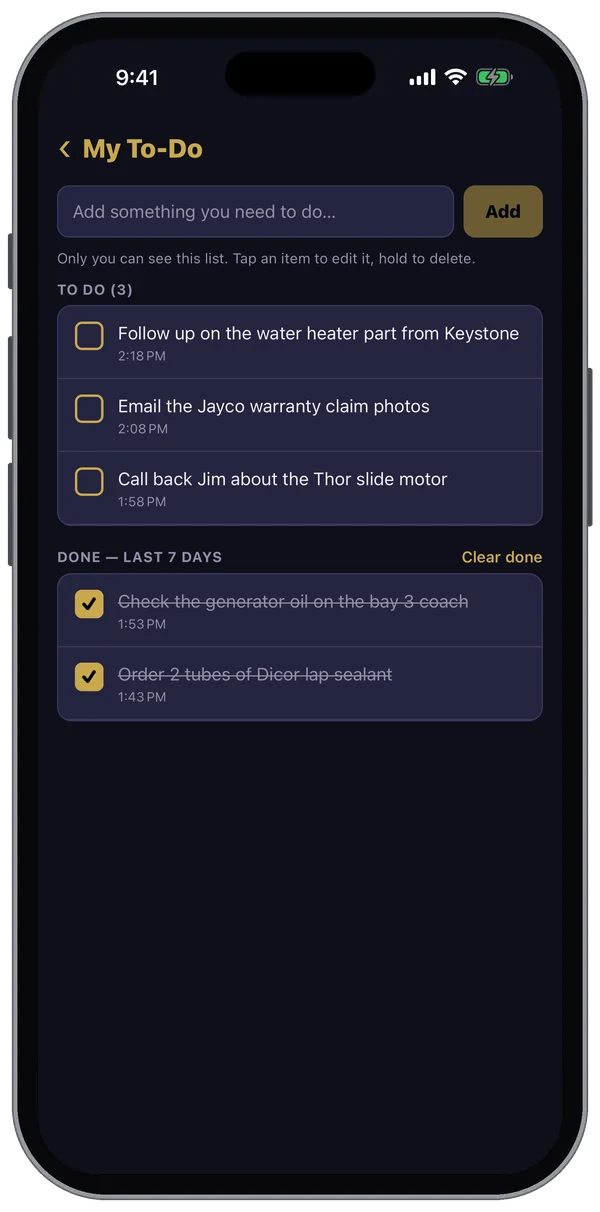
Adding an item
- Tap More, then My To-Do at the top. The gold number next to it is how many items you still have open.
- Type what you need to do in the box at the top. Your phone's microphone key works here too.
- Tap Add (or the keyboard's done key). The newest item goes to the top.
Checking things off
Tap the box next to an item and it moves down to Done with a line through it. Tap it again if you need it back on your list.
Done items stay under Done — last 7 days, then drop off the list. Tap Clear done to remove them all now.
Changing or deleting an item
- Edit: tap the item's text, change it, and tap done on the keyboard.
- Delete: press and hold the item, then tap Delete.
Pull down on the list to refresh it.
It's the same list as on the web version, under Main → My To-Do in the left menu. Add something at the counter and it's on your phone when you walk into the shop.
Still stuck? Send us a message (or email [email protected]) and tell us what you were trying to do — we answer within one business day.